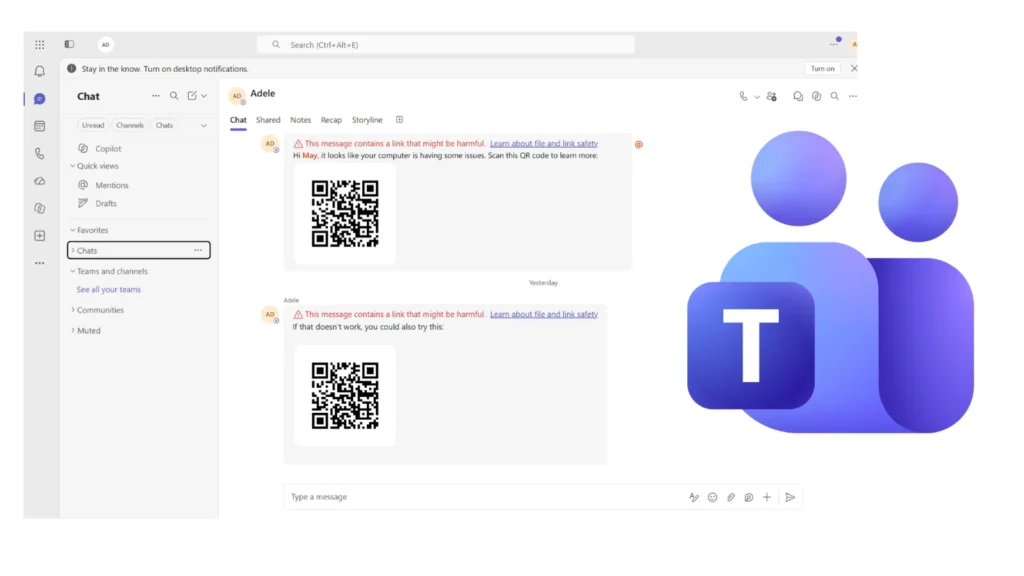
Microsoft is expanding phishing protection in Teams to identify malicious web addresses concealed inside QR-code images. The Defender for Office 365 enhancement analyzes encoded destinations after a message has been delivered and can display a warning directly on suspicious content in internal or external conversations.
The change targets “quishing,” a technique that replaces an ordinary clickable link with a scannable image. QR codes can move the victim from a managed computer to a personal or lightly monitored phone, where a copied Microsoft sign-in page may be harder to recognize and enterprise browser controls may not apply.
How the new Teams check works
When a Teams message includes a QR code, Defender extracts the URL represented by the image and evaluates the destination. If the address is known to be harmful, Teams can mark the message with a warning. Microsoft’s examples include both a notice that a link may be dangerous and a channel message blocked for potentially harmful content.
The distinction is important. The update is described as post-delivery protection, so organizations should not interpret it as a promise that every malicious image will be stopped before anyone can view or scan it. Detection may occur after delivery as reputation and threat intelligence change.
Microsoft announced the capability through Message Center notice MC1490905. Worldwide deployment began in early October 2026 and is expected to conclude in early November. It applies to Teams environments covered by Defender for Office 365 and does not require individual users to enable a new setting.
ZAP can remove eligible internal messages
Organizations licensed for Defender for Office 365 Plan 1 or Plan 2 may receive an additional response when Zero-hour Auto Purge for Teams is enabled. ZAP can act on eligible malicious internal messages after delivery, potentially blocking content that initially reached users before it was classified as dangerous.
This new analysis complements, rather than replaces, an earlier control for QR codes sent by external users. That feature obscures QR images until the recipient deliberately reveals them. The Defender enhancement instead examines the encoded destination and reacts when that destination is judged malicious. One control adds friction before viewing; the other supplies threat detection and response after delivery.
Security teams gain hunting data
Extracted QR destinations will also become available to defenders in Microsoft Defender XDR Advanced Hunting. Analysts can query the MessageUrlInfo table and use the value QRCode in the UrlLocation field to distinguish addresses recovered from images from conventional text links.
That visibility should help incident responders connect a reported message with other recipients, conversations, and related destinations. It can also support measurement: teams can track whether QR-based lures are increasing, which departments receive them, and whether the same infrastructure appears across email and collaboration channels.
- Review Teams threat-protection policies and confirm whether ZAP is enabled and appropriate.
- Update hunting queries and playbooks to include QRCode entries in MessageUrlInfo.
- Tell employees that warnings may appear after delivery and that a previously visible message is not automatically safe.
- Investigate scans that lead to unexpected authentication, consent, or device-enrollment requests.
Human verification remains essential
QR phishing often uses familiar pressure: an account allegedly needs verification, a document is waiting, or an urgent technical problem must be fixed. The code hides the address until the victim scans it, reducing the opportunity to inspect the domain beforehand. On a phone, small screens and habitual biometric sign-in can further weaken scrutiny.
Employees should confirm unexpected requests through a trusted channel, especially when a message asks them to scan a code and then enter credentials. Password managers can also provide a useful warning because they generally will not autofill credentials on an unfamiliar phishing domain.
Microsoft’s change closes an important visibility gap inside collaboration messages, but layered defense remains necessary. Image analysis, URL reputation, post-delivery removal, endpoint telemetry, phishing-resistant authentication, and user verification all address different stages of the same attack.
Leave a Reply
You must be logged in to post a comment.