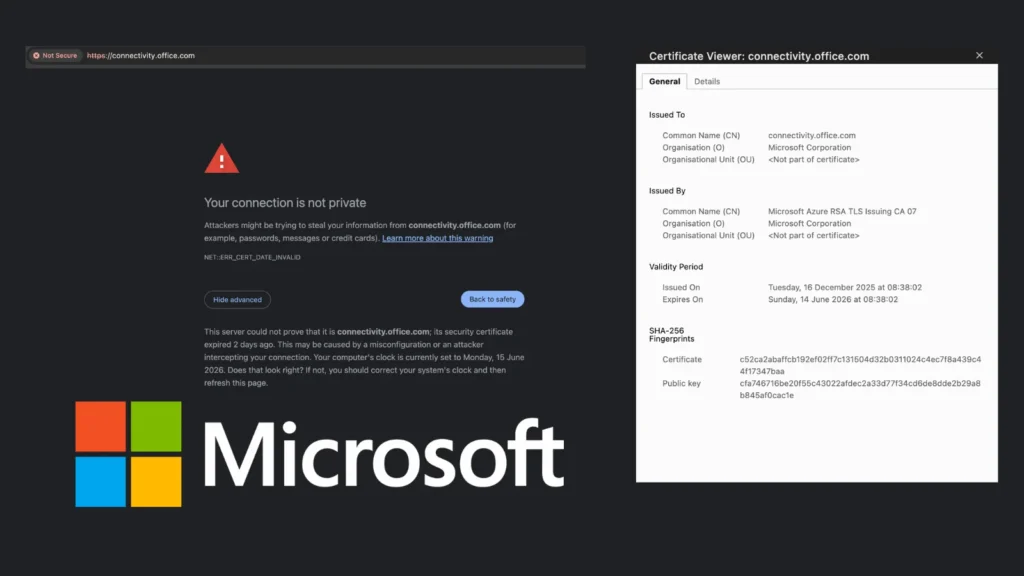
Microsoft has allowed the TLS certificate for connectivity.office.com to expire without renewal, causing browser security warnings and breaking diagnostic workflows for IT administrators worldwide. The domain, widely used by enterprise IT teams to verify their network’s connectivity to Microsoft 365 services, now displays certificate expiry errors in all Chromium-based browsers — an embarrassing operational security failure from one of the world’s largest technology companies.
What Happened
The TLS certificate for connectivity.office.com, issued by Microsoft Azure RSA TLS Issuing CA 07, expired on Sunday, June 14, 2026 at 08:38:02 UTC. The certificate had been issued on December 16, 2025, with only a 180-day validity window — a standard modern certificate lifespan — but Microsoft failed to initiate renewal before expiry.
The SHA-256 fingerprint of the expired certificate is confirmed as c52ca2abaffcb192ef02ff7c131504d32b0311024c4ec7f8a439c44f17347baa, with the domain owned by Microsoft Corporation and verified through SSL server report analysis conducted on Monday, June 15, 2026.
Chromium-based browsers, including Google Chrome and Microsoft Edge, now display a NET::ERR_CERT_DATE_INVALID error when accessing the domain, with the error message explicitly stating: “This server could not prove that it is connectivity.office.com; its security certificate expired 2 days ago.”
Why This Matters for Enterprise IT
The connectivity.office.com domain is not a consumer-facing product. It is a purpose-built diagnostic endpoint specifically designed for enterprise IT teams, network engineers, and system administrators to:
- Verify that their network’s firewalls are not blocking Microsoft 365 traffic
- Confirm proxy and network appliance configurations are not interfering with Microsoft services
- Diagnose Microsoft 365 connectivity issues during onboarding or incident response
- Run automated network health checks as part of infrastructure monitoring pipelines
With the certificate now expired, automated tooling, scripts, and monitoring systems that rely on HTTPS connections to this endpoint will either fail silently or throw certificate validation errors, disrupting IT operational workflows at precisely the moments administrators most need reliable diagnostics.
Operational Security Implications
While this is not a traditional cybersecurity attack, certificate management failures carry real security risks. Expired certificates can:
- Create opportunities for attackers to perform man-in-the-middle attacks if users are trained to bypass certificate warnings
- Erode trust in certificate warning systems, potentially conditioning users to ignore legitimate security alerts
- Break automated security monitoring pipelines that depend on valid HTTPS connections
- Leave organizations temporarily blind to Microsoft 365 connectivity issues during certificate outage windows
The incident is particularly notable given Microsoft’s concurrent messaging around Zero Trust security architecture and its advocacy for automated certificate lifecycle management through its own Azure services. Allowing a diagnostic domain to expire without renewal contradicts best practices Microsoft itself promotes to customers.
Industry Context
Certificate expiry incidents are far from rare, even among major technology companies. However, the connectivity.office.com domain occupies a unique position in enterprise IT infrastructure as a diagnostic baseline tool. Its unexpected failure effectively removes a key tool from administrators’ arsenals at a time when Microsoft 365 has become critical infrastructure for organizations globally.
The 180-day certificate validity window — a product of evolving Certificate Authority best practices and browser vendor requirements — means that organizations and vendors alike must maintain robust automated renewal pipelines. Manual certificate management at this cadence is increasingly untenable and error-prone.
What Administrators Should Do Now
Until Microsoft renews and reissues the certificate, administrators should avoid bypassing the browser security warning manually, as this sets a dangerous precedent for certificate error acceptance in enterprise environments. Alternative Microsoft 365 connectivity testing tools and the Microsoft Remote Connectivity Analyzer at testconnectivity.microsoft.com may serve as interim alternatives for verifying Microsoft 365 network access. IT teams should update any automated scripts or monitoring configurations that directly reference connectivity.office.com to handle certificate errors gracefully or route through alternative endpoints until the issue is resolved.
Leave a Reply
You must be logged in to post a comment.