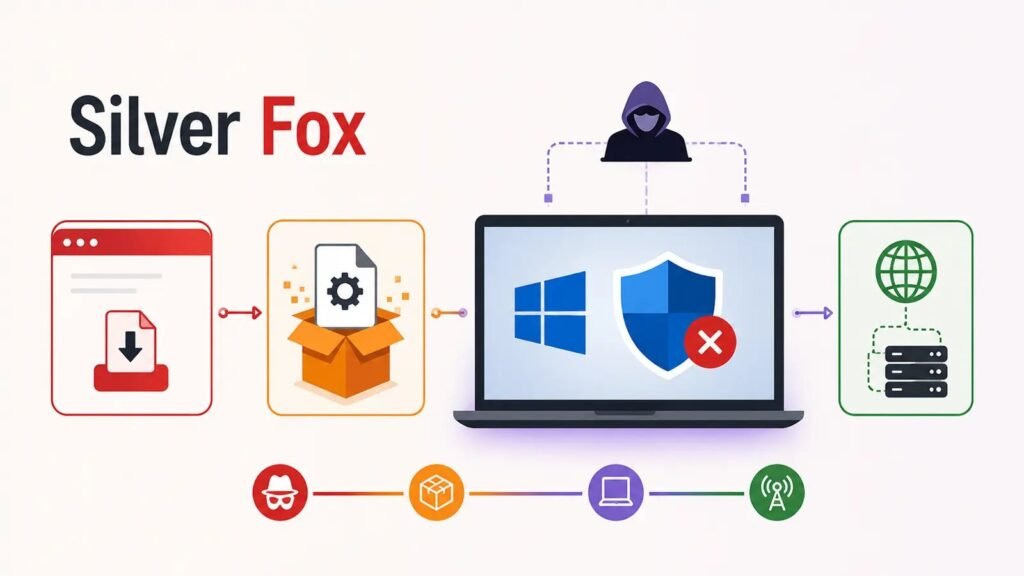
A malware campaign linked to the Silver Fox group — also tracked under the alias Yinhu — is spreading through counterfeit software installers designed to look like downloads from well-known vendors, then using that foothold to systematically dismantle Microsoft Defender on infected Windows machines. Microsoft’s own analysts assessed “with moderate confidence” that the activity aligns with previously reported Silver Fox operations, though the company has stopped short of formally attributing the campaign to a specific nation-state.
Cloned Download Pages, Shape-Shifting Payloads
The campaign’s entry point is deception rather than exploitation. Attackers built lookalike websites mimicking a wide range of legitimate software brands, including Razer, Microsoft Edge, Kaspersky, Sejda PDF, NetEase’s Youdao Translate, DiskGenius, Baidu Netdisk, oCam Screen Recorder, draw.io, SteelSeries, Sogou, Calibre, and MindMaster. Victims who click “Download now” receive a ZIP archive whose filename stays consistent from download to download — but whose contents and file hash change almost every time.
Researchers documented two separately downloaded copies of the same archive differing in hash within roughly 69 seconds of each other, a polymorphic trick specifically aimed at defeating security tools that rely on filename or static-hash blocklists. Once extracted, a wrapper executable drops additional files into randomly named directories, often tucked into locations like Users\Public, ProgramData, or Program Files (x86). A secondary infection route abuses the Windows Installer service, msiexec.exe, letting malicious code execute through a trusted, signed Windows component while the victim watches what looks like an ordinary software installation.
Turning Off the Alarm Before Breaking In
Once running, the malware creates scheduled tasks with deliberately bland, forgettable names — Microsoft observed ones labeled “Deadline Mission Target” and “Hierarchy Tools Smooth Inventory” — that restart its code roughly every 60 seconds to survive reboots and interruptions. More concerning is a short-lived task the malware runs with SYSTEM privileges, Windows’ highest local access level, specifically to strip away Microsoft Defender’s protections. Through this task, the malware issues PowerShell commands to exclude entire folders from scanning, writes malicious code-integrity policies, and injects code into legitimate processes to reduce its visibility to security tooling.
After establishing that blind spot, the malware moves to cover its tracks and block recovery. It deletes Windows volume shadow copies to frustrate restoration efforts, disables Windows Update services, and hardens its dropped directories against removal. Microsoft’s incident responders observed both fully automated activity and hands-on-keyboard behavior from attackers, including attempts at lateral movement over SMB — a strong signal that at least some compromises are being actively managed by a human operator rather than left to run unattended.
Who’s Being Targeted
The campaign has struck organizations across healthcare, manufacturing, gaming, technology, logistics, government, and education. While the majority of documented victims had ties to China-based operations or were Chinese-speaking users, the use of widely recognized international software brands as lures suggests the threat isn’t confined to a single region or industry vertical.
Indicators Worth Watching For
Because the payload itself changes shape with nearly every download, Microsoft and independent researchers are pushing defenders toward behavior-based detection rather than static signatures. The telltale sequence to watch for is consistent even when the file hashes aren’t: a download from a spoofed vendor page, an executable staged in a randomly named folder, a short-lived SYSTEM-level scheduled task, followed almost immediately by Defender exclusion changes, shadow-copy deletion, or Windows Update service tampering.
Recommended detection and response priorities include:
- Reviewing download referrer data for traffic from newly registered or brand-mimicking domains
- Auditing recently created executables in writable folders such as Users\Public and ProgramData
- Flagging unusual msiexec.exe activity that doesn’t correspond to known, approved software deployments
- Alerting on any modification to Microsoft Defender exclusion lists, especially changes made through scheduled tasks
- Watching for volume shadow copy deletion and Windows Update service disablement, both strong indicators of active tampering
- Keeping tamper protection and network protection features enabled and enforced through policy, not left optional for end users
Practical Advice for Organizations and Users
The simplest defense remains avoiding the initial lure altogether: downloading software only from official, verified publisher sites and treating unexpected ZIP-based installers — even ones referencing familiar brand names — with suspicion. Security teams should ensure web and email filtering controls block known delivery domains associated with the campaign, and any device suspected of compromise should be isolated quickly, since Silver Fox’s persistence mechanisms and defense-tampering steps are designed to let a shallow initial compromise escalate into a much deeper foothold if given time to run.
Leave a Reply
You must be logged in to post a comment.