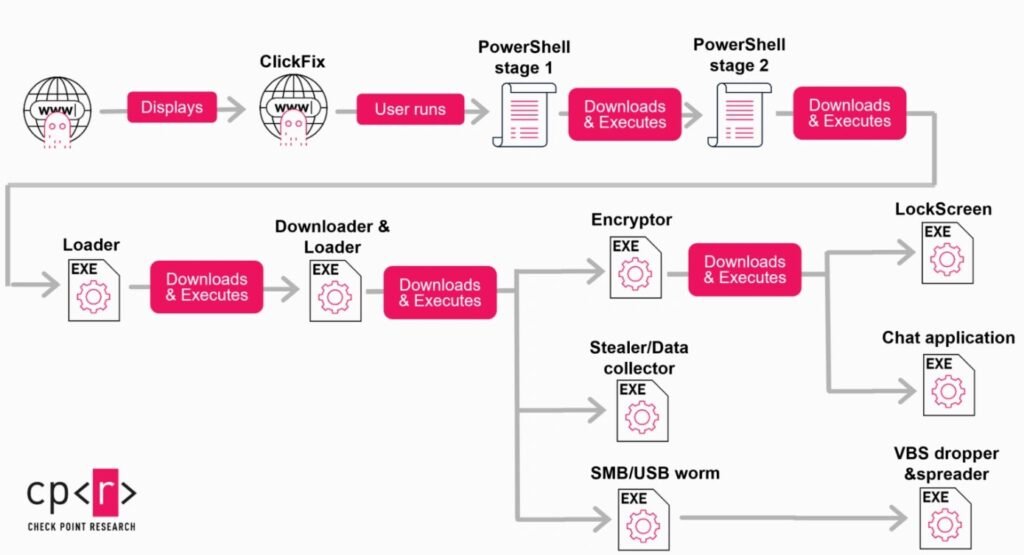
A newly documented malware campaign is turning neglected WordPress websites into an army of disposable command-and-control servers. Dubbed StopAndProtect, the operation has been linked to more than 6,000 unique victim IP addresses worldwide, with infection concentrations heaviest in the United States, Russia, and India, according to research from Check Point.
Built on Unmaintained Websites
The campaign’s infrastructure backbone is roughly 2,000 compromised WordPress domains that operators rotate through as active command-and-control nodes. Investigators found that these sites share a common weakness: neglect. One analyzed site had reportedly gone unpatched since 2021, accumulating nearly 40 known vulnerabilities in that time — more than enough for automated tooling to find a way in.
That pattern lines up with the broader problem researchers point to: outdated WordPress core installations, abandoned themes, and unmaintained plugins provide a near-limitless supply of easily exploitable entry points, letting attackers convert ordinary business or personal websites into malicious relays without the site owner ever noticing.
The Fake CAPTCHA Trick
Once a WordPress site is compromised, the attackers inject a fraudulent CAPTCHA verification prompt into its pages. Rather than the usual “click the boxes with traffic lights” challenge, the fake prompt instructs visitors to copy a block of text and paste it directly into a Windows terminal to “verify” they’re human — a well-established social engineering technique known as “ClickFix.” Visitors who comply unknowingly execute a malicious PowerShell command on their own machine, handing the attackers their initial foothold.
A Multi-Stage Infection Built for Flexibility
From that first PowerShell execution, the infection unfolds in stages. A second PowerShell script and a series of modular .NET loaders pull down and deploy whichever payload fits the operator’s current objective, which can include:
- Ransomware for direct encryption and extortion
- Credential-stealing malware
- Screen lockers
- VBS-based spreaders
- A worm component that propagates over USB drives and network shares
Notably, the operators don’t rush straight to encryption. Instead, they use the initial access to run an extended reconnaissance phase — enumerating documents, logging keystrokes, mapping network shares, periodically capturing screenshots, and scraping communication data from the infected machine. Only after building a picture of what the victim’s systems and data are actually worth do the operators decide whether to escalate to ransomware deployment, effectively triaging victims before committing their most damaging payload.
An Operator’s Slip Reveals the Toolkit
Ironically, the campaign’s own infrastructure gave researchers a rare look inside its operations. Exposed PHP endpoints and open directory listings on some of the compromised C2 sites revealed internal activity logs and telemetry collected from victims. In one particularly notable lapse, an operator appears to have infected their own personal machine and inadvertently uploaded internal development files — including a custom Visual Basic 6 tool built specifically to mass-manage the hijacked WordPress domains, toggle the fake CAPTCHA overlays on and off, and push new payloads across the botnet.
That kind of operational security failure gave defenders unusually direct visibility into how the campaign is administered day to day, though the operators are likely to shift infrastructure and tooling now that details are public.
Recommendations for Site Owners, End Users, and Security Teams
For WordPress administrators, the fix is unglamorous but effective: consistent patching. Check Point’s research points to update discipline as the single biggest gap the campaign exploits. Recommended steps include:
- Enforcing regular update schedules for WordPress core, themes, and all installed plugins
- Periodically scanning for unauthorized or unexpected PHP scripts on the server
- Monitoring for unauthorized modifications to
.htaccessfiles - Auditing administrator accounts for any that weren’t created by the legitimate site team
For everyday users, the advice is simpler: any website that asks you to open a terminal and paste in a command as part of a “verification” step is not performing a real CAPTCHA check — it’s attempting to compromise your machine, and the prompt should be closed immediately without following the instructions.
Security teams, meanwhile, should treat unexpected PowerShell execution originating from a browser session as a high-priority detection opportunity, alongside monitoring for anomalous outbound data transfers that could indicate the reconnaissance phase already described is underway.
StopAndProtect is a useful reminder that a website doesn’t need to be a high-value target itself to become dangerous — it just needs to be forgotten about long enough for someone else to put it to use.
Leave a Reply
You must be logged in to post a comment.