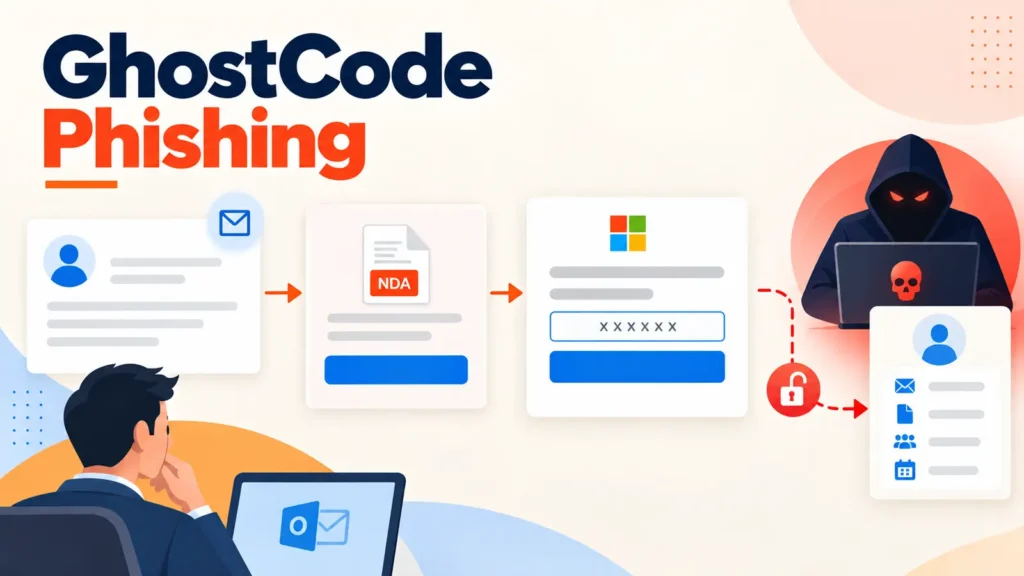
An Account Takeover That Never Touches a Password
A newly documented phishing kit called GhostCode is showing how attackers can fully hijack a Microsoft 365 account without ever stealing a password or defeating multi-factor authentication in the traditional sense. Instead, the kit persuades victims to personally approve a sign-in that hands control of their account to the attacker, using an authentication flow that Microsoft itself considers legitimate.
Researchers at eSentire identified the campaign in late August and named it after the hidden code embedded in its lure documents and its use of infrastructure previously linked to GHOSTnet during device enrollment. The technique bypasses the usual warning signs security teams train employees to watch for, since nothing about the process looks like a fake login page or a suspicious password prompt.
A Convincing, Slow-Burn Setup
The campaign doesn’t start with an obvious phishing email. It begins with an ordinary-looking message submitted through a target company’s own business contact form, with the attacker posing as procurement staff. A follow-up message requests that the recipient sign a non-disclosure agreement, then delivers a WeTransfer link containing a password-protected HTML file. That attachment presents a document-sharing lure and ultimately redirects the victim toward what looks like a routine Microsoft sign-in step.
The file itself is built to resist casual inspection. It’s padded with junk data, its visible text is broken up with HTML comments, and the redirect address stays encrypted until the correct password is entered. Once a victim reaches the phishing server, a browser challenge and location checks work to filter out automated security scanners before the real lure is ever served.
Abusing a Feature Built for Smart TVs
The technical core of GhostCode is its abuse of OAuth’s device authorization flow, a mechanism originally designed to let devices without a full keyboard or browser, like a smart TV, complete a sign-in. The attacker’s server requests a device code using Microsoft’s own Authentication Broker application ID, embeds that code into a polished fake document portal, and asks the victim to enter it on a genuine Microsoft page.
Because the victim is interacting with an authentic Microsoft sign-in screen, they complete the process, including any multi-factor authentication step, exactly as they would for a legitimate request. In practice, though, they are approving the attacker’s device to access their account rather than their own. Once approved, GhostCode’s operators receive the resulting authentication token, quietly begin operating inside the account, and redirect the victim to a decoy NDA document so nothing appears out of the ordinary.
Speed Is the Point
In one intrusion documented by researchers, attackers made nine successful API calls and registered three devices to the compromised account in just 78 seconds, obtaining a Primary Refresh Token in only 32 seconds. That token type is significant because it can support continued sign-on across Microsoft 365 services without prompting the user to authenticate again, giving the attacker durable, low-friction access.
The operators also route their activity through residential proxy addresses selected to match the victim’s actual geographic location, which helps the Microsoft sign-in prompt look unremarkable and can defeat location-based anomaly alerts that security teams rely on.
Why Revoking the Token Isn’t Enough
One of the more troubling findings is that simply revoking a stolen token does not automatically remove the rogue devices an attacker registered during the attack. Those devices persist in the tenant until an administrator explicitly finds and removes them, meaning a seemingly resolved incident can leave a quiet backdoor in place.
Defending Against Device-Code Abuse
Because this attack exploits a legitimate authentication pathway rather than a software flaw, the most effective defenses are policy-based rather than patch-based. Security teams should consider:
- Blocking device-code authentication through Conditional Access for the vast majority of users, reserving narrow exceptions only for genuine service or provisioning workflows that require it.
- Applying device-compliance requirements so a stolen token alone isn’t enough to gain lasting access from an untrusted device.
- Alerting on successful device-code sign-ins followed by scripted or automated-looking requests, or by multiple device registrations originating from a single non-interactive session.
- Reviewing newly enrolled devices whenever suspicious device-code activity surfaces, since removal is not automatic.
- Training staff to treat any unexpected instruction to “enter this code” on a Microsoft page as a red flag, regardless of how routine the surrounding business context seems.
GhostCode is a reminder that as organizations harden against password theft and classic MFA-bypass techniques, attackers are increasingly targeting the authentication protocols themselves, finding legitimate-looking paths that never require breaking a single technical control.
Leave a Reply
You must be logged in to post a comment.