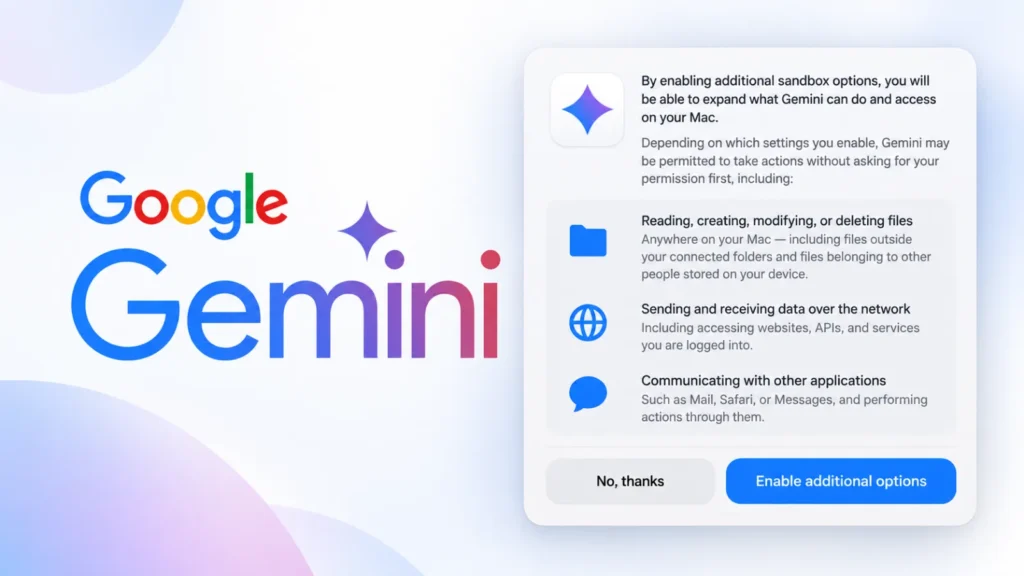
A hidden setting uncovered inside a recent build of the Gemini Desktop app suggests Google is preparing to let its AI assistant do far more than chat. Buried under an “Additional sandbox options” menu, the discovered permission, reportedly labeled “Full Access”, would allow Gemini to read, create, modify, or delete files anywhere on a Mac, interact directly with other installed applications, and communicate over the network largely without per-action approval.
From Chat Assistant to Computer Operator
Gemini’s current desktop footprint is scoped to folders a user explicitly connects to it. The newly spotted permission text describes something categorically different: unrestricted file access across the entire system, including files outside those connected folders and, notably, files belonging to other people who use the same Mac. The same setting reportedly extends Gemini’s reach into applications like Mail, Safari, and Messages, letting the assistant trigger actions through them rather than simply reading their data.
Perhaps most significant for security teams is the network dimension: the permission would reportedly let Gemini send and receive data over the internet without requiring approval for each individual connection. That would open the door to the agent independently browsing websites, calling APIs, interacting with cloud services, and reaching accounts the user is already signed into, capabilities aimed squarely at letting Gemini complete multi-step tasks such as research, document organization, email drafting, and web-based workflows without constant hand-holding.
Useful Autonomy, Attractive Target
The appeal for everyday productivity is obvious, but so is the new attack surface it creates. An AI agent with simultaneous access to the local filesystem, browser sessions, messaging apps, and open network connections becomes an unusually high-value target. The risk is not hypothetical prompt-engineering theory: a malicious webpage, a booby-trapped document, a compromised browser session, or even a deceptive email could all attempt to steer the agent’s behavior through what researchers call prompt injection.
Consider a simple scenario: a user asks Gemini to summarize documents in a connected folder. If the same agent session is also permitted to browse the web and talk to other applications, a malicious page visited during that session could try to redirect the agent into quietly gathering sensitive files, opening an already-authenticated service, or exfiltrating data externally, all without the user issuing any instruction to do so. The threat extends beyond deliberately crafted attacks to include ordinary compromised sites, untrusted file formats, and vulnerable third-party software the agent might interact with along the way.
Guardrails Google Is Reportedly Keeping
Despite the sweeping scope of the Full Access option, reporting indicates Google intends to preserve explicit confirmation requirements for a defined set of higher-stakes actions. Gemini would still be required to ask for direct user approval before:
- Making a purchase
- Creating new accounts
- Accepting legal terms or agreements
- Modifying sensitive personal information
That split points to a tiered permission model, where ordinary computer-use actions run with broad autonomy while a short list of consequential actions still requires a human in the loop.
Still Unconfirmed, Still Worth Preparing For
Google has not formally announced the Full Access permission, and the option remains hidden rather than generally available. Industry watcher TestingCatalog has speculated the underlying computer-use capability may be tied to a future, more capable Gemini model, though that connection is unconfirmed. The discovery also lands just after Apple signaled its own plans to tighten macOS Full Disk Access specifically because of the risks posed by increasingly capable AI agents, a sign that both platform owners and AI vendors are converging on the same concern from opposite directions.
For IT and security teams, the practical takeaway is to get ahead of the policy question before features like this ship broadly. Recommended steps include restricting AI assistants from sensitive folders by default, avoiding broad permission grants on unmanaged or personal devices, applying least-privilege principles to any agentic tool, and building a clear review process for what data and applications an AI assistant is allowed to touch. As desktop AI agents gain the kind of system-level reach once reserved for trusted native software, the permission prompts users click through may become one of the most consequential security decisions on the modern desktop.
Leave a Reply
You must be logged in to post a comment.