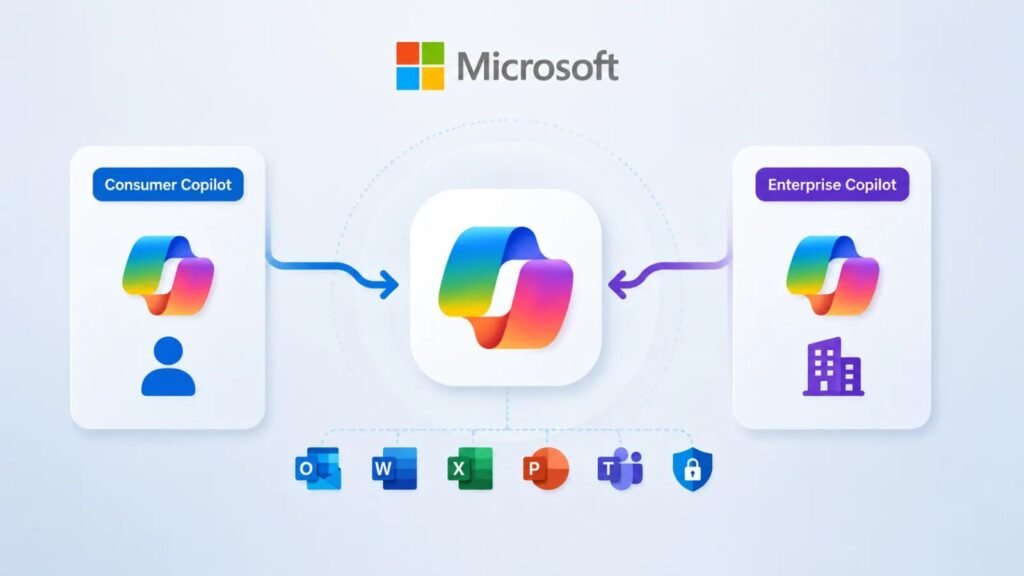
Microsoft is collapsing two previously separate product lines — its consumer-facing Copilot app and its enterprise Microsoft 365 experience — into a single unified application. The change, which the company frames as a “super app” for productivity and AI, folds Word, Excel, PowerPoint, Outlook, PDFs, cloud file access, Copilot Chat, and custom AI agents into one interface, accessible from any of Windows, Android, iOS, or the web.
What’s Actually Changing
The former Microsoft 365 app has been rebranded as the Microsoft 365 Copilot app, and its web home is moving to m365.cloud.Microsoft. Users heading to the old office.com or microsoft365.com addresses will be redirected automatically. Inside the app, Microsoft is pitching seamless movement between chat-based AI assistance and traditional productivity tools — upload a file, ask Copilot about it, then jump straight into editing it in Word or Excel without switching apps.
The rollout of this unification effort has actually been underway since January 2025, but Microsoft is now pushing the consolidation further: as of August 18, 2026, several previously separate features — Group Chat, Podcasts, and Deep Research — are being retired as the company streamlines the app around its unified design.
Who Gets What
Access still scales with subscription tier. Microsoft 365 subscribers get higher usage limits for AI features, access to more advanced models, and the ability to build and run custom agents. Free-tier users retain access to Copilot Chat, image generation, and file uploads, but within tighter capacity limits.
The Governance Question Nobody Loves to Ask
Merging consumer and enterprise experiences into one interface is a genuine convenience — and also a classic recipe for boundary confusion. Microsoft maintains that personal Microsoft accounts and organizational accounts managed through Microsoft Entra remain architecturally separated behind the scenes, with enterprise compliance settings, commercial data boundaries, and tenant-level policies all continuing to apply to organizational users exactly as before.
That’s a reasonable technical claim, but it puts more weight than usual on users correctly understanding which account context they’re operating in at any given moment — something that becomes harder, not easier, once the visual and functional differences between “personal Copilot” and “work Copilot” shrink to near zero. A single familiar interface makes it easy to forget which side of the account boundary a given chat, file upload, or AI agent session is actually running on.
What IT and Security Teams Should Be Watching
- Identity switching — users moving between personal and work accounts inside the same app increases the risk of data or files ending up in the wrong context, especially on personal devices with both account types signed in.
- Data classification — as agent-based workflows pull content from cloud files, chat history, and uploaded documents into a single conversational thread, existing data loss prevention rules need to be re-validated against the new unified surface.
- File-sharing controls — the seamless jump from “ask Copilot” to “edit in Word/Excel” can blur the line between AI-generated content and files subject to normal sharing and retention policies.
- User understanding of account boundaries — Microsoft’s assurance of architectural separation is only as good as end users’ ability to tell which mode they’re in; security awareness training may need an update.
- Agent permissions — with custom AI agents now built into the same interface used for personal tasks, organizations should audit what data sources and actions those agents are permitted to touch.
The Bigger Picture
Microsoft’s consolidation reflects a broader industry push toward single-surface AI assistants that follow users everywhere rather than living in siloed apps. That’s a sensible product direction, and Microsoft’s compliance architecture likely does hold up to scrutiny. But history suggests that convenience features which erase visible boundaries between personal and corporate contexts tend to generate incidents — not because the underlying controls fail, but because users stop noticing the boundary is there at all. Enterprises rolling this out should treat the migration as an opportunity to re-brief staff on where personal AI use ends and managed, monitored enterprise use begins.
Leave a Reply
You must be logged in to post a comment.