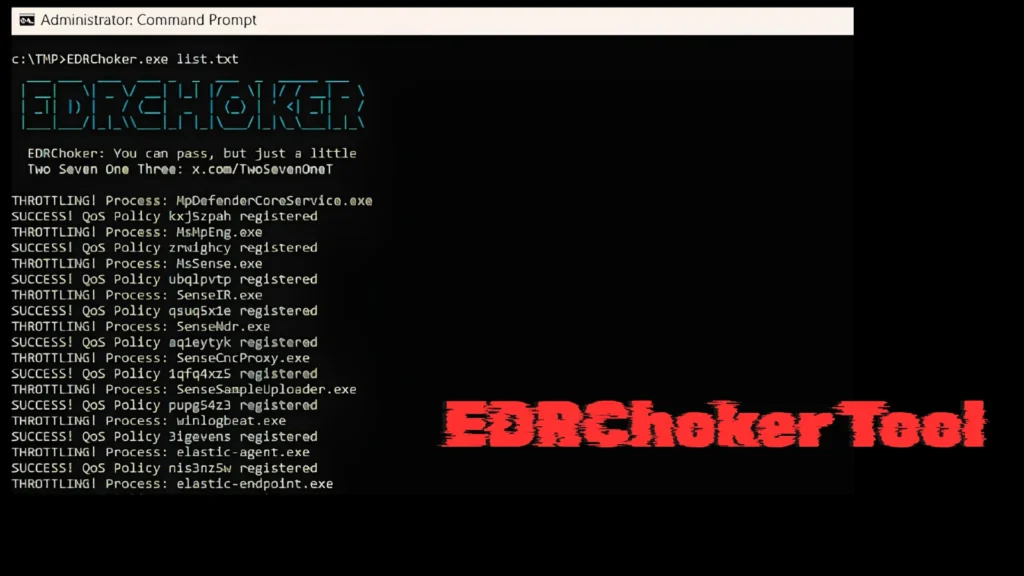
A newly released open-source red team tool called EDRChoker has security teams on alert. Rather than killing EDR processes or injecting code — techniques that trigger immediate detection — EDRChoker takes a subtler approach: it throttles an EDR agent’s network bandwidth to near-zero using Windows’ own native Quality of Service engine, effectively cutting the agent off from its cloud infrastructure without generating a single firewall alert.
Developed by security researcher @TwoSevenOneT and published on GitHub, the tool exploits Windows Policy-Based Quality of Service (QoS) to isolate EDR processes from their command servers, rendering them unable to report detections, receive updated policies, or respond to remote administrator commands.
Why Cloud-Connected EDR Is the Target
Modern EDR platforms depend on a persistent, low-latency connection between the endpoint agent and a cloud management server. That server relationship is central to everything the EDR does: telemetry collection, real-time threat correlation, policy updates, and administrative control. Sever that connection and the agent goes operationally dark — it may still be running, but it can no longer do its job.
This architectural dependency is precisely what EDRChoker exploits. By applying a QoS policy that throttles the EDR process to just 8 bits per second, EDRChoker makes it impossible for the agent to complete even a basic TLS handshake (which requires between 3 KB and 6 KB of certificate chain data). The agent continuously times out before exchanging a single packet.
Why Traditional Methods Get Caught
Red teams have historically used two main methods to interrupt EDR communications: Windows Defender Firewall rules and the Windows Filtering Platform (WFP) API. Tools like EDRSilencer weaponize the FwpmFilterAdd0 API to register outbound network filters that selectively drop EDR agent packets.
The critical limitation is forensic visibility. WFP-based blocking generates packet-block and packet-drop events that security platforms like Elastic Defend actively detect through dedicated detection rules, raising immediate alerts. EDRChoker sidesteps this entirely.
The Technical Advantage: Operating Below WFP
EDRChoker’s stealth comes from where it operates in the Windows network stack. QoS throttling is enforced by pacer.sys, an NDIS Lightweight Filter Driver that sits directly above the physical NIC — one layer below WFP. Because it operates at a lower tier, pacer.sys rules govern packets that WFP-level EDR monitoring tools never even reach.
The key distinction in the stack:
- WFP operates inside
tcpip.sysat the Transport layer - pacer.sys intercepts raw Ethernet frames at the NDIS boundary, closer to the hardware
- EDR telemetry monitoring at the WFP level is blind to packets governed by pacer.sys rules
The result: no packet-block events, no firewall alerts, no WFP audit trail. The EDR connection simply dies with timeout errors — a pattern that can be misattributed to network instability rather than intentional interference.
How EDRChoker Works in Practice
The tool accepts an input file of EDR process names. For each process, it auto-generates a uniquely named QoS policy using the process name combined with a random GUID, ensuring no two deployments produce identical rule signatures. The policies survive system reboots.
The tool operates in two modes:
- Install mode — Reads a list of EDR process names and creates uniquely named QoS policies that throttle each to 8 bps, persisting across reboots
- Remove mode — Executed with no parameters, cleanly purges all installed QoS policies
The command syntax is straightforward:
New-NetQosPolicy -Name "EDRProcess_[GUID]" -AppPathNameMatchCondition "agent.exe" -ThrottleRateActionBitsPerSecond 8 -PolicyStore ActiveStore
Implications for Defenders
EDRChoker exposes a critical blind spot: most enterprise security monitoring does not watch Get-NetQosPolicy output or flag new QoS policy creation events. Defenders should consider the following:
- Monitor QoS policy changes — Alert on any new NetQosPolicy entries targeting known security tool process names
- Implement EDR health monitoring — Many cloud-managed EDR platforms report agent connectivity status; an agent that goes silent may indicate interference rather than a crash
- Extend visibility below WFP — As attackers descend deeper into the Windows network stack, defenders must extend monitoring equally deep
- Detect pacer.sys activity — Log and alert on unusual use of Windows QoS APIs targeting security-critical processes
EDRChoker underscores a critical architectural reality: EDR tools that depend entirely on cloud connectivity carry an inherent single point of failure. When that connection is disrupted — whether through network instability or deliberate interference — the tool operates blind. Defenders must account for this in their monitoring strategy and ensure that EDR health itself is a monitored security signal.
Leave a Reply
You must be logged in to post a comment.