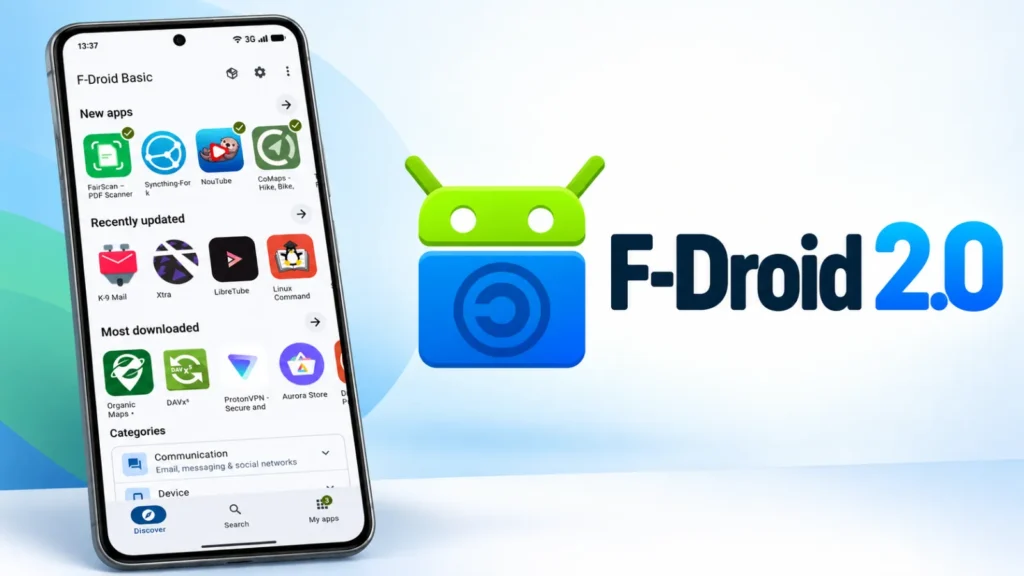
F-Droid has released version 2.0 of its official Android client, completing the alternative app store’s most substantial redesign in roughly a decade. The update follows more than a year of development and 14 test builds, and it will reach users through a staged rollout over the coming weeks.
The new version matters to security- and privacy-conscious Android users because F-Droid is a prominent distribution channel for free and open-source applications. Rather than applying a cosmetic theme, the project rebuilt large portions of the client with Kotlin and Jetpack Compose, bringing its architecture closer to current Android development practices and making future maintenance and testing easier.
A simpler interface for finding open-source apps
F-Droid 2.0 reduces primary navigation to three sections: Discover, Search and My Apps. Discover combines browsing and category exploration, while My Apps centralizes installed software, available updates and problems that may require attention. Settings and the Nearby Swap feature have moved to the top bar, leaving the main navigation less crowded.
Discovery is a major focus. The app now highlights recently added software, newly updated projects and popular repository downloads. Categories are more detailed, so users looking for tools such as VPN clients, firewalls, password managers, launchers or navigation software can narrow their search without relying on exact application names. Games are divided into 17 genres rather than one broad group.
Search has also expanded beyond titles. Queries can now match descriptions, categories and translated text, with improved support for Chinese, Japanese and Korean writing systems. Multiple filters can be combined for category, device compatibility and so-called anti-features.
Filters provide more transparent choices
Anti-features are labels that help users understand properties they may want to avoid, such as dependence on non-free network services. The new filtering controls make it easier to look for software that matches both functional requirements and a user’s licensing or privacy preferences. Someone can, for example, request a specific type of application, require compatibility with their device and exclude unwanted service dependencies in one search.
This transparency is one reason F-Droid remains relevant even as mainstream app stores strengthen their security programs. Open-source availability does not automatically make every application safe, but clearer metadata and repository policies can help users make informed decisions and examine software provenance.
Updates become more automatic
Version 2.0 checks for and installs application updates automatically by default, while retaining manual and granular controls for people who prefer them. The familiar pull-to-refresh action for update checks has moved to the My Apps overflow menu.
Faster update adoption can have a security benefit because known flaws remain exploitable when users postpone new releases. At the same time, some users may wish to review change logs or permissions before installation, so the continued availability of fine-grained controls is important.
F-Droid is also taking advantage of newer Android installer capabilities. On compatible devices, a pre-approval mechanism allows users to authorize an installation earlier instead of waiting for the download to finish. The project says wider platform changes—partly influenced by European competition policy—have allowed alternative stores to offer a smoother installation experience.
Privacy caveats require attention
The redesign changes several privacy-related features. Tor configuration now uses more general proxy settings, with a Tor VPN presented as the simpler recommended approach. The app-hiding feature changes only F-Droid’s icon and name; it does not conceal the application from Android settings or a forensic examination. Users should not mistake visual disguise for strong device-level secrecy.
Two omissions may be especially important for people with elevated safety needs. F-Droid 2.0 does not currently support the F-Droid Privileged Extension, and the panic-trigger capability that could wipe apps has not returned. Anyone relying on those features for operational security, personal safety or rapid data removal should assess the impact before upgrading.
- Review automatic-update preferences after installation.
- Confirm that required privacy and accessibility features remain available.
- Use anti-feature filters to identify unwanted external dependencies.
- Remember that a renamed icon does not hide an app from system inspection.
Overall, F-Droid 2.0 gives a foundational open-source Android service a more maintainable base and a far better discovery experience. Its modern installer workflow and update defaults may improve routine security, but users with specialized privacy requirements should make the upgrade decision only after reviewing the missing capabilities.
Source: Cyber Security News, published September 26, 2026.
Leave a Reply
You must be logged in to post a comment.